

Website traffic systems
How to get traffic to your website: 16 durable systems
To get traffic to your website, make the site easy to discover, give the right people a strong reason to visit, distribute each useful asset, and create a reason to return.
A list of tactics won't tell you which route fits your audience, what to do first, or where a weak campaign is breaking down.
Traffic works better as a portfolio of systems than a to-do list. Each of the 16 systems below is a repeatable loop with an audience, a destination, a distribution route, a return path, a measurement process, and an owner. A local contractor, an ecommerce store, a B2B software company, and a publisher shouldn't use the same mix. Each has a different audience, sales process, budget, and definition of a valuable visit.
Together, the systems cover free and paid routes, along with the foundations every route needs. Read the full page as a reference or go directly to the system that fits your situation. Each section contains enough to start, and the deeper Tech Help Canada links are there when you want them.
If you've been publishing, posting, and hoping, use this plan to replace the guesswork.
Reference map
Use this guide as a working traffic system map
Jump to the foundation you need, a specific traffic system, the diagnostic tools, or the 90-day action plan.
- The short answer: how to get traffic to your website
- Understand the traffic foundations
- Measure value before choosing a channel
- Make sure the site is ready for traffic
- Choose systems for your traffic portfolio
- System 1: organic search and AI discovery
- System 2: local search
- System 3: a linkable content library
- System 4: free tools and product-led utility
- System 5: email and lifecycle traffic
- System 6: organic social distribution
- System 7: community traffic
- System 8: video, audio, and live media
- System 9: referrals and partnerships
- System 10: digital PR and link earning
- System 11: creators, affiliates, and sponsorships
- System 12: paid search
- System 13: paid social, display, and retargeting
- System 14: marketplaces, directories, and syndication
- System 15: direct outreach and account-based traffic
- System 16: offline-to-online traffic
- Connect the systems with a return path
- Measure traffic without fooling yourself
- A 90-day website traffic plan
- Where traffic plans break down
- Your one-page traffic plan
- Frequently asked questions
- Sources
Contents
The short answer: how to get traffic to your website #
Here's the operating plan: seven steps, followed by the full breakdown.
- Choose one key event. Decide which visitor action matters most, such as a purchase, qualified form submission, booked call, trial, donation, or newsletter signup.
- Define the audience and moment. Identify who should visit, what they need, and whether they're discovering a problem, comparing options, or ready to act.
- Prepare the destination. Give each campaign a page that answers the visitor's question, loads well on mobile devices, earns trust, and offers a logical next step.
- Select one primary acquisition engine. Start with the channel that best matches the audience's intent, your available assets, and the speed you need. Add supporting channels after the first one works.
- Create something worth choosing. Publish a page, tool, video, offer, event, or reference that is more useful and specific than a generic summary.
- Build distribution into production. Decide how searchers, subscribers, communities, partners, journalists, creators, or paid audiences will encounter the asset before you publish it.
- Measure the full path. Track qualified visits, engagement, key events, and business results. Keep the experiments that create value and change the ones that don't.
Every system here runs the same core loop:
- Audience need
- Useful destination
- Qualified distribution
- Meaningful action
- Measurement
- Improvement
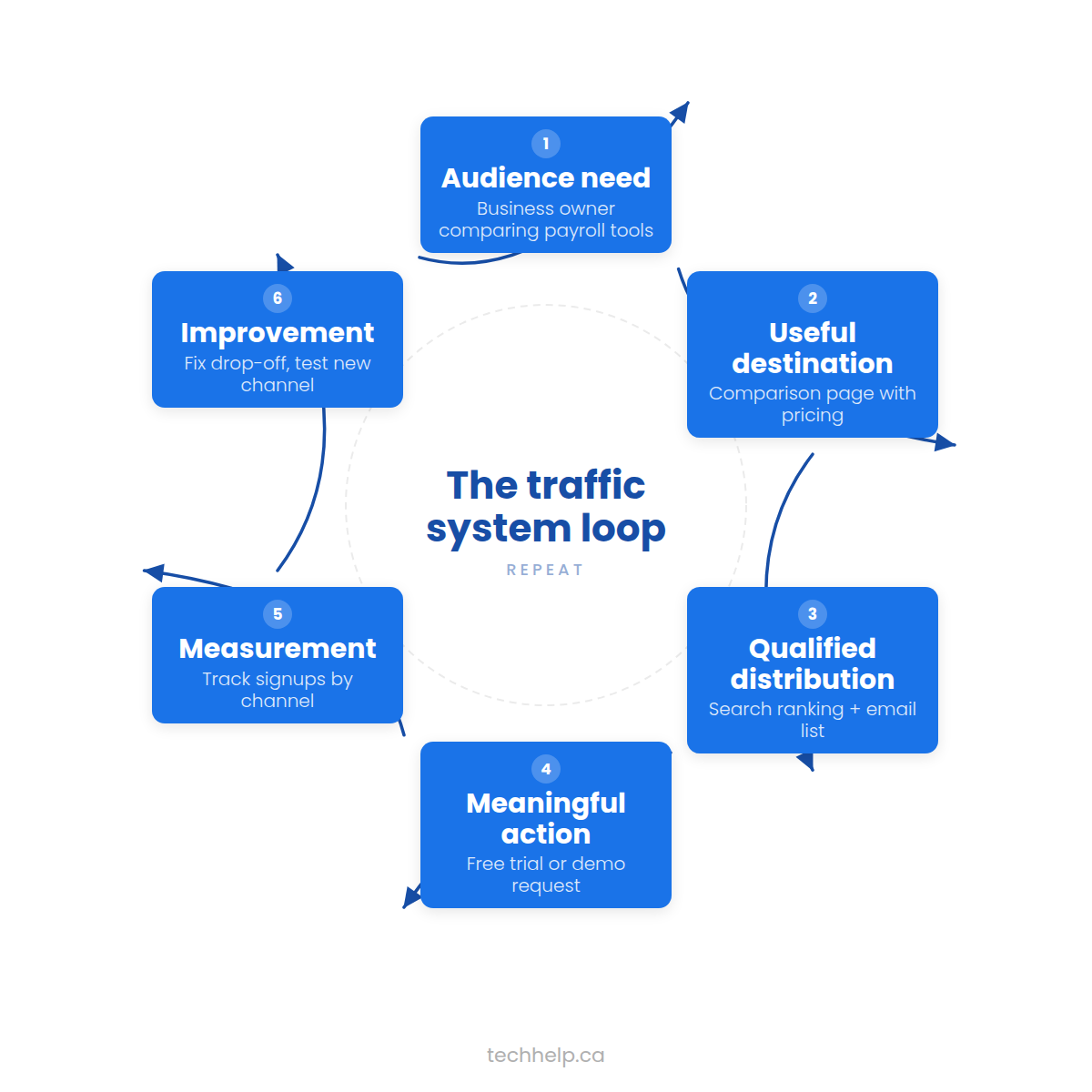 Expand
The channel changes. The logic doesn't.
The five jobs below show what each part of the loop has to accomplish.
Understand the traffic foundations #
Every durable traffic system does one or more of five jobs:
- 1Capture existing demand
Reach people already looking for an answer, product, service, or local provider. SEO, local search, directories, marketplaces, and paid search do this well.
- 2Create demand
Reach people who fit the audience but aren't actively searching yet. Social content, video, podcasts, events, advertising, and public relations can introduce the problem or opportunity.
- 3Borrow trust and distribution
Reach an established audience through partners, publications, creators, communities, associations, and customer referrals.
- 4Bring people back
Use email, subscriptions, useful updates, saved tools, community, and remarketing to turn a first visit into an ongoing relationship.
- 5Convert and protect the visit
Make the website fast, usable, credible, measurable, and aligned with the promise that earned the click.
These jobs reinforce one another. A research report can rank in search, earn media coverage, support sales conversations, give partners something to share, fuel social posts, and attract email subscribers. One strong asset can therefore power several traffic systems without becoming several disconnected campaigns.
Traffic source, medium, and channel are different #
Analytics terminology can make a simple question sound complicated.
- A source identifies where a visit came from, such as Google, LinkedIn, a partner site, or a newsletter platform.
- A medium describes the general method, such as organic search, referral, email, or paid social.
- A channel groups related sources and mediums for reporting.
Modern analytics tools recognize more than four kinds of traffic. Common groups include organic search, paid search, organic social, paid social, organic video, email, referral, affiliates, display, direct, SMS, and other campaign types.
Direct traffic also needs careful interpretation. It can include people who typed the address or used a bookmark, but it can also contain visits for which the analytics system couldn't identify a source. A large direct bucket may reflect brand demand, missing campaign tags, privacy restrictions, redirects, links in documents, or several of those factors at once.
Don't judge your channel mix against a universal percentage. A restaurant, a new online store, and a well-known software brand will naturally have very different patterns. Compare your channels by the quality and value they produce for your business.
A practical map of traffic types #
Traffic categories vary by analytics product and reporting setup. The following map covers the routes most teams need to recognize:
Swipe or scroll sideways to see the full table.
| Traffic type | How the visit begins | What to check |
|---|---|---|
| Organic search | An unpaid result in a search engine or supported AI search feature | Query, landing page, search engine, country, device |
| Paid search or shopping | A paid search, shopping, or product-listing advertisement | Search term, keyword or product, campaign, cost, key event |
| Referral | A link on another website | Referring site, referring page, destination, assisted outcome |
| Organic social | An unpaid post, profile, share, or conversation on a social network | Network, post, creator, landing page, key event |
| Organic video | An unpaid video result, description, profile, or platform link | Platform, video, placement, companion page |
| Paid social, display, or video | A paid placement shown to an audience or on another property | Audience, creative, placement, frequency, cost, business value |
| Email, SMS, or push | A message sent to an opted-in or otherwise eligible audience | Campaign, segment, link, consent, unsubscribe, key event |
| Affiliate | A tracked partner recommendation tied to a fee or commission | Partner, placement, commission, reversals, customer quality |
| Marketplace or platform | A listing, feed, app store, directory, or syndicated item | Platform, listing, fees, destination, ownership of customer relationship |
| Direct or unattributed | No clear source was passed to analytics | Missing campaign tags, redirects, documents, private sharing, privacy loss, brand demand |
| Offline-to-online | A typed URL, QR code, code, call, or search prompted by a physical touchpoint | Placement, short URL, campaign tag, self-reported source, store or call outcome |
“Organic” and “free” aren't synonyms. Organic systems avoid a fee for each visit, but they still require strategy, labour, production, tools, and maintenance. Paid systems buy distribution; they don't remove the need for a strong asset or destination.
Assemble a portfolio of traffic systems #
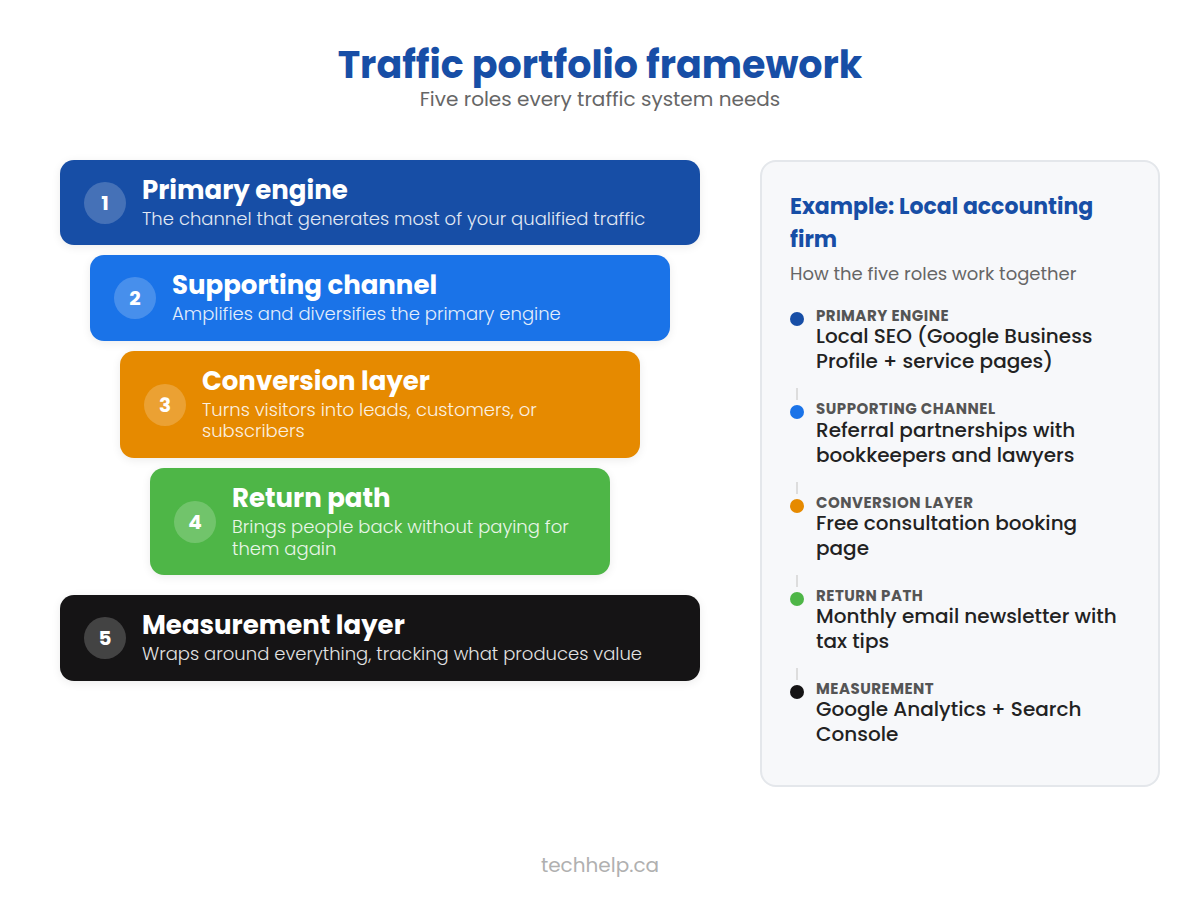
A resilient plan doesn't rely on one platform, but it also doesn't try to run ten at once. Start with a primary engine, a supporting channel, and a return path.
Swipe or scroll sideways to see the full table.
| Portfolio role | Purpose | Possible choices |
|---|---|---|
| Primary engine | Produces most new qualified visits | SEO, paid search, YouTube, partnerships, outbound campaigns |
| Supporting channel | Distributes assets and reaches adjacent audiences | Email, social media, PR, communities, creators, events |
| Return path | Brings interested people back | Newsletter, product alerts, saved account, community, remarketing |
| Conversion layer | Turns attention into business value | Service page, product page, comparison, demo, trial, lead magnet |
| Measurement layer | Shows where the system works or leaks | Analytics, Search Console, CRM, call tracking, ecommerce reporting |
 Expand
For example, a local accounting firm might use local SEO as its primary engine, referral partnerships as support, an email newsletter as its return path, and a consultation page as the conversion layer. A new ecommerce company might use paid social to test demand, search content to build a durable acquisition engine, email for repeat visits, and product pages for conversion.
The goal isn't equal traffic from every source. It's a portfolio in which each channel has a clear job.
Before choosing a channel, you need a way to tell whether it's producing value.
Measure value before choosing a channel #
How to get quality traffic #
More visits aren't automatically better. Quality traffic comes from people you can actually serve, arriving with a reason to act.
Start by naming one primary key event for the website. In Google Analytics, a key event is an event you mark as especially important to the business. It could be a completed purchase, a qualified quote request, a booked appointment, a trial or account creation, a donation, a newsletter signup, or a visit to a dealer or store locator.
Supporting events can explain the path, but they shouldn't replace the business outcome. A video play, scroll, or brochure download may be useful evidence of interest. It isn't automatically equal to revenue or a qualified lead.
Calculate traffic value #
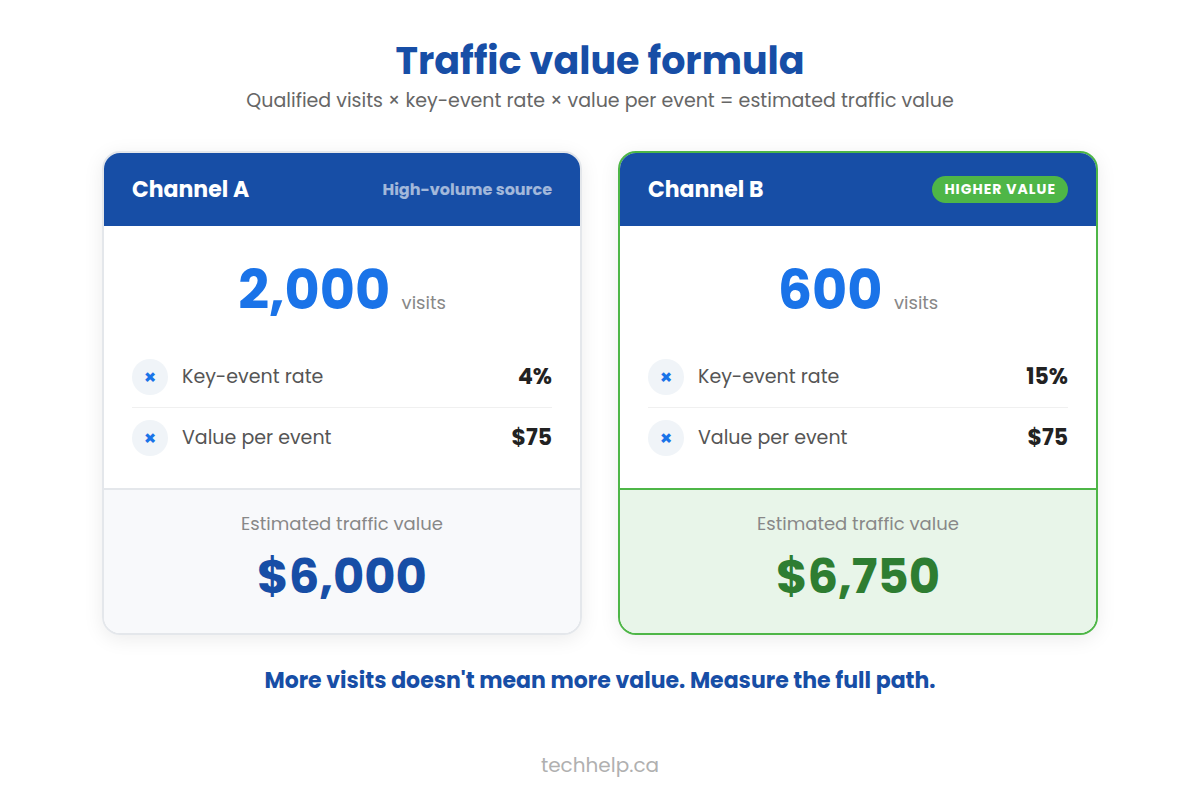
Use this simple model to compare channels:
Suppose one channel sends 2,000 visits, 4% complete the key event, and each event is worth an estimated $75. Its estimated traffic value is:
A second channel might send only 600 visits but convert 15% at the same value:
 Expand
The smaller channel is more valuable in this example. The estimate still needs context: lead quality, close rate, refunds, repeat purchases, margins, and attribution can change the result. Its purpose is to force a better comparison than visits alone.
Define a qualified visit #
A qualified visitor generally meets three conditions:
- The person fits the audience you can serve.
- The page matches what the person expected to find.
- The visit has a plausible path to a useful outcome, now or later.
Not every valuable visit converts during the first session. A buyer may read a guide, return through branded search, subscribe, compare vendors, and buy weeks later. Use customer relationship management and ecommerce data where possible so the original acquisition channel isn't judged only by immediate conversions.
Make sure the site is ready for traffic #
Promotion magnifies whatever's already there. If the page is confusing, slow, untrustworthy, or impossible to measure, more traffic exposes the problem to more people.
You don't need a perfect site before starting. You do need a credible path from arrival to action.
Confirm that the page can be discovered #
For pages intended to appear in search:
- Make sure search engines are allowed to crawl the page.
- Check that the page isn't accidentally marked
noindex. - Link to it from another relevant, crawlable page on your website.
- Include it in the XML sitemap when appropriate.
- Use a canonical URL that reflects the page you want indexed.
- Verify the rendered page contains the important text and links.
Google Search Console's URL Inspection tool can show whether Google has indexed a specific URL and identify some reasons it hasn't. Submission doesn't guarantee indexing or ranking, but it helps you find avoidable technical barriers.
Match the destination to the promise #
Someone who clicks an advertisement for payroll software should reach a page about that product, not a generic homepage. A searcher asking how to calculate payroll deductions needs a useful answer before a sales pitch. A conference attendee scanning a QR code should reach the resource promised on the slide.
A strong destination usually answers five questions quickly:
- Am I in the right place?
- Is this for someone like me?
- What will I get here?
- Why should I trust it?
- What can I do next?
Whichever system you use to drive traffic to your landing page, the page has to continue the message that earned the visit. Consistent language, offer details, imagery, and calls to action reduce the mental work required to proceed.
Protect the mobile experience #
Google uses the mobile version of a site's content for indexing and ranking. More importantly, visitors shouldn't have to pinch, zoom, fight a menu, or re-enter information because a form doesn't work on a phone.
Test important pages on real devices. Check:
- Whether the primary content and call to action appear without obstruction
- Whether menus, buttons, form controls, and consent choices are usable by touch
- Whether text is readable and layouts avoid horizontal scrolling
- Whether images, video, and interactive tools resize correctly
- Whether the mobile page contains the same essential content and metadata as desktop
Responsive design is usually the simplest way to serve the same URL and core content across devices.
Set a performance baseline #
Use field data, not only a single lab test, when evaluating page experience. Google's Core Web Vitals currently focus on:
- Largest Contentful Paint (LCP): within 2.5 seconds
- Interaction to Next Paint (INP): under 200 milliseconds
- Cumulative Layout Shift (CLS): below 0.1
These thresholds are assessed at the 75th percentile of page loads. Search Console's Core Web Vitals report and PageSpeed Insights can help identify patterns. Fixing oversized media, blocking scripts, unstable layouts, and slow server responses often helps, but the right remedy depends on the measured bottleneck.
Protect trust, security, and access #
Serve the site over HTTPS and redirect HTTP versions consistently. Keep the content management system, themes, plugins, server software, and dependencies supported and updated. Use strong authentication, appropriate access levels, tested backups, and monitoring for changes or malware. Tech Help Canada's guide to securing a website provides a practical starting point.
Collect only the customer and tracking data the business needs. Explain material uses, restrict access, establish retention rules, and configure consent choices for the jurisdictions and technologies involved. A traffic campaign shouldn't require a visitor to surrender unrelated personal information.
Accessibility protects the audience the campaign worked to attract. Use semantic headings, keyboard-operable controls, visible focus states, labelled forms, sufficient colour contrast, descriptive link text, useful alternative text, and captions or transcripts for relevant media. Test the important conversion path with a keyboard and common assistive technology, not only an automated scanner. Tech Help Canada's introduction to web accessibility covers the wider standard.
Install measurement before promotion #
At minimum, record:
- Sessions and users by channel
- Landing-page performance
- Your primary key event and meaningful supporting events
- Revenue or qualified leads when available
- Campaign parameters for links you control
- Search impressions, clicks, queries, and pages through Search Console
Test the full path yourself. Submit the form, complete a test purchase, click the phone number, and confirm that the events appear in reporting. An untested analytics setup can create months of confident but wrong decisions.
Once the destination and measurement are solid, you're ready to choose the systems that'll bring people there.
Choose systems for your traffic portfolio #
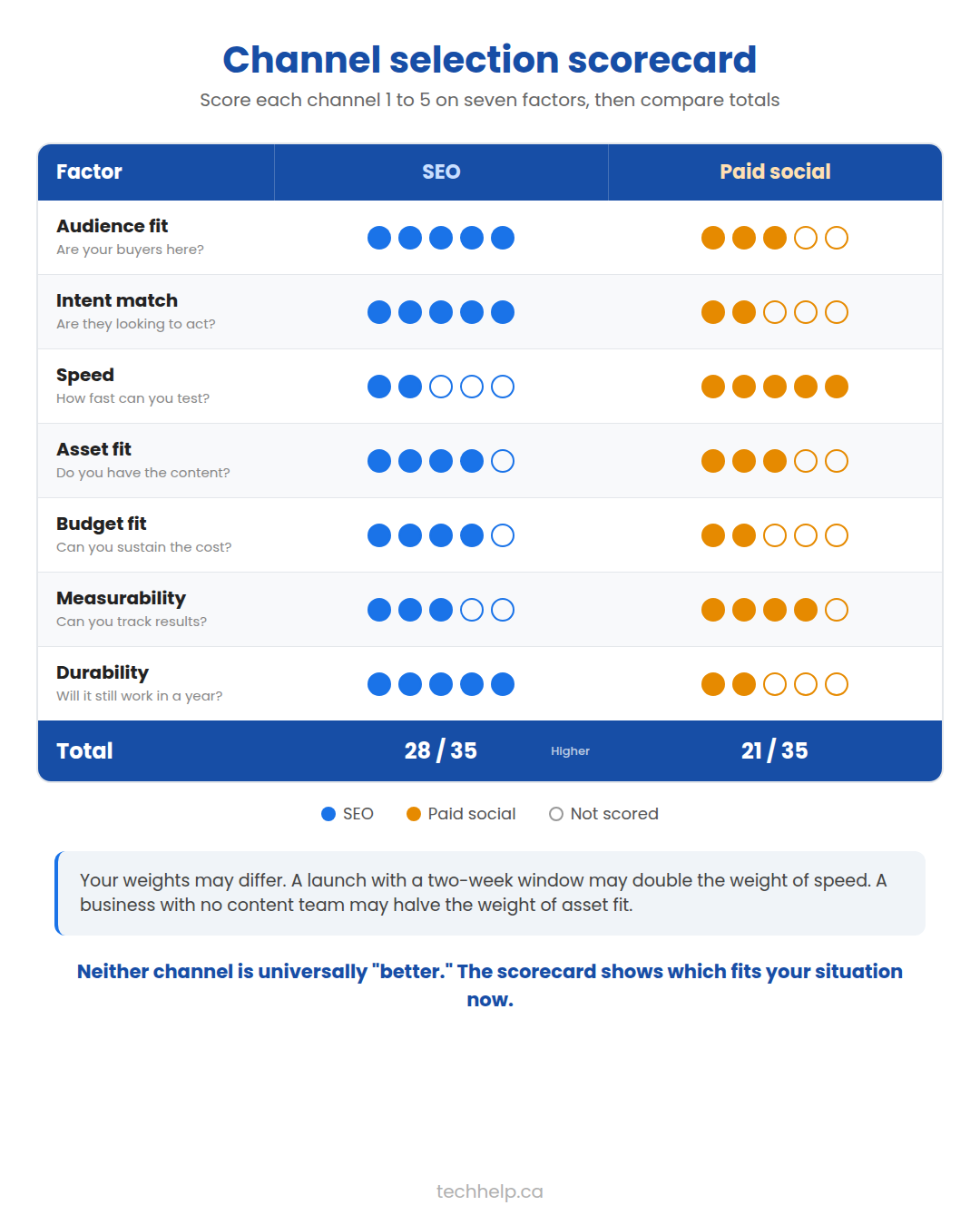
The best first channel isn't the most popular one. It's the one that fits your audience's behaviour and your constraints. Score each serious option from one to five:
| Factor | Question |
|---|---|
| Audience fit | Does the audience actively use this channel for the problem? |
| Intent | How close are users to a meaningful action? |
| Speed | Can the channel produce evidence within the required timeline? |
| Asset fit | Can the team produce the format the channel rewards? |
| Budget fit | Can the business fund production, media, tools, and management? |
| Measurement | Can visits and outcomes be tracked well enough to learn? |
| Durability | Will the work retain value after this campaign ends? |
 Expand
Weight the factors that matter most. A company with a two-week launch window may give speed twice the weight of durability. A bootstrapped publisher may do the opposite.
A practical channel starting point #
Swipe or scroll sideways to see the full table.
| Situation | Strong first option | Reason |
|---|---|---|
| People already search for the problem or service | SEO or paid search | Captures existing intent |
| The offer is new and search demand is unclear | Paid social, creator tests, or direct outreach | Tests audience and message quickly |
| The business serves a defined local area | Google Business Profile and local SEO | Reaches nearby customers with relevant intent |
| The subject benefits from demonstration | YouTube, webinars, or short video | Shows the process or result |
| Trust is the main obstacle | Partnerships, customer referrals, case studies, or PR | Transfers credibility from people the audience knows |
| The business already has customers or subscribers | Email and lifecycle campaigns | Activates an existing relationship |
| The team has proprietary knowledge or data | Search-led content and digital PR | Creates a useful asset that can rank and earn citations |
Start with one primary engine unless the team has the capacity to run more. Use a supporting system to distribute the same core asset. Add a new engine when the first has a working process, a reliable owner, and evidence of value.
The 16 durable traffic systems at a glance #
The table is a map, not a ranking. “Free” means no required media fee; it doesn't mean the work has no cost.
Swipe or scroll sideways to see the full table.
| System | Core loop | Free route | Paid accelerator | Strong fit |
|---|---|---|---|---|
| 1. Organic search and AI discovery | Answer demand → earn visibility → update | Technical SEO, useful pages, internal links | Research, production, technical support | Existing search demand |
| 2. Local search | Complete local presence → earn trust → convert nearby intent | Business Profile, reviews, local pages | Local search ads, sponsored local media | Location or service-area businesses |
| 3. Linkable content library | Find information gap → build asset → distribute → maintain | Research, guides, case studies | Data collection, design, commissioned research | Expert-led or information-rich businesses |
| 4. Free tools and product-led utility | Solve task → save or share result → return | Templates, calculators, generators | Development, data, embedded promotion | Repeatable problems and measurable outputs |
| 5. Email and lifecycle | Earn permission → deliver value → bring people back | Newsletter, onboarding, alerts | Sponsorship, list-growth ads, automation | Any business with repeat value |
| 6. Organic social | Publish native value → converse → route interest | Posts, employee voices, direct engagement | Production and social management | Audiences that gather on a network |
| 7. Communities | Contribute → build recognition → share relevant resource | Forums, groups, Q&A, owned community | Sponsorship, events, community staff | Trust-heavy or specialized subjects |
| 8. Video, audio, and live media | Teach or demonstrate → distribute → direct to resource | Video, podcast, livestream, webinar | Production, guest booking, promotion | Demonstrable or personality-led topics |
| 9. Referrals and partnerships | Create mutual value → exchange qualified introductions | Customer referrals, co-marketing, integrations | Referral rewards, partner funds | Complementary audiences and trust transfer |
| 10. Digital PR and link earning | Find story → provide evidence → earn coverage | Expert commentary, newsworthy data, outreach | Research, PR support, media assets | Credible expertise or original evidence |
| 11. Creators, affiliates, and sponsorships | Recruit trusted distributor → track result → deepen winners | Product seeding or reciprocal collaboration | Fees, commission, sponsored placements | Products and offers that others can explain |
| 12. Paid search | Buy high-intent click → match page → measure economics | No media-free version; SEO is the organic counterpart | Search and shopping campaigns | Existing commercial intent |
| 13. Paid social, display, and retargeting | Reach audience → test message → convert or return | Organic social is the unpaid counterpart | Social, display, native, video, remarketing | Demand creation and visual offers |
| 14. Marketplaces, directories, and syndication | List or republish → reach built-in demand → move to owned relationship | Free listings and selective syndication | Featured listings, marketplace ads, distribution fees | Products, services, jobs, events, and media |
| 15. Direct outreach and account-based traffic | Identify account → send relevant reason → route to tailored page | Manual email, direct messages, sales outreach | Data, tools, advertising, custom assets | High-value, narrow business audiences |
| 16. Offline-to-online | Create physical attention → offer digital utility → track handoff | Speaking, packaging, receipts, local relationships | Print, sponsorships, direct mail, out-of-home ads | Local, event, retail, and physical-product contexts |
The systems can share assets. A calculator may earn organic search traffic, give creators something to demonstrate, support sales outreach, attract links, and collect email subscribers. Reuse is a strength when each system still has a clear audience, route, and measure.
The first system captures demand people already express through search.
1System 1: organic search and AI discovery #
Organic search can become a reliable source of qualified traffic over time, but there's no guaranteed ranking or fixed timeline. SEO helps search engines understand your pages and helps the right people decide those pages are worth visiting.
Google notes that the effect of a change can take anywhere from hours to several months. Give meaningful changes a few weeks before drawing conclusions, then use Search Console and analytics data to decide what to improve.
Start with the searcher's job #
Keyword research is most useful when it reveals what people are trying to accomplish. Search volume and difficulty scores can help prioritize topics, but the query's intent should determine the page.
Common intent patterns include:
- Learn: The person needs an explanation, process, example, or answer.
- Compare: The person is weighing approaches, products, providers, or costs.
- Act: The person wants to buy, book, download, register, or contact someone.
- Navigate: The person wants a specific brand, site, location, or account.
Study the current results for the query. Are they guides, product pages, local listings, videos, tools, or category pages? The mix reveals what the search engine believes people commonly want, but you still need to bring your own customer knowledge to the decision.
Longer and more specific queries can expose a precise need, yet they don't automatically convert better. Evaluate the language, situation, and likely next step instead of treating word count as intent.
For a repeatable research method, use Tech Help Canada's SEO keyword research model.
Build the page the query deserves #
Choose the page type that can complete the searcher's job.
- Use a service page when someone wants to understand or hire a service.
- Use a product or category page when someone is shopping.
- Use a guide when the task needs explanation and action.
- Use a comparison when meaningful alternatives need fair evaluation.
- Use a calculator, template, database, checklist, or interactive tool when utility is more valuable than more prose.
- Use a local page only when the business genuinely serves that place and can provide location-specific value.
A page should have a clear purpose, original value, and enough detail to finish that purpose. There's no ideal word count. A concise definition may fully answer one query; a technical implementation guide may need thousands of words, diagrams, examples, and code.
Make the search result understandable #
Use a unique, clear, concise, and accurate page title. Avoid rigid character targets. Google can create a title link from the title element, visible page heading, prominent text, link text, and other sources.
Write a useful meta description as a short summary, not a promise that Google must display. Search snippets are often assembled from page content and may change by query. The page's opening should therefore make sense even when a search engine selects it as the preview.
Organize the page with descriptive headings, useful anchor links when the article is long, accessible media, and internal links that help a reader continue. Use the primary phrase where it accurately describes the topic. Repetition for its own sake makes the writing worse and can become keyword stuffing.
Use the search surface that fits the answer #
Search traffic isn't limited to a row of text links. Depending on the query and business, people may encounter images, videos, product listings, local results, news, maps, featured snippets, discussion results, or personalized discovery surfaces.
Create the media or structured information the task needs. Use descriptive filenames and alt text for meaningful images, accurate product and availability data for shopping, strong thumbnails and transcripts for video, and clear dates and authorship for time-sensitive reporting. Follow the eligibility and policy requirements for the specific search feature, and don't assume that markup guarantees an enhanced result.
Build topic coverage around customer needs #
A topic cluster can help people and search engines find related material. Start with a central page, then add supporting pages for questions that deserve their own treatment. Link the pages where the relationship helps the reader.
The structure should reflect real information architecture, not a quota. Five excellent pages can be more useful than fifty near-duplicates. Avoid producing a page for every tiny keyword variation or city name when the content would be substantially the same.
Tech Help Canada's content marketing strategy explains how audience, journey stage, content pillars, distribution, and measurement fit together.
Strengthen technical discovery #
Technical SEO supports discovery and interpretation. Prioritize issues that can materially affect important pages:
- Crawl blocks and accidental
noindexdirectives - Broken or misleading canonical tags
- Important pages with no internal links
- Duplicate URLs competing for the same purpose
- Redirect chains and loops
- Server errors and persistent soft 404s
- JavaScript rendering failures
- Mobile content differences
- Structured data that doesn't match the visible page
An XML sitemap helps search engines discover URLs, but it doesn't replace internal links or guarantee indexing. A robots.txt file controls crawling; it isn't a reliable method for removing an indexed page from search.
Treat AI search as part of search, not a separate loophole #
AI-generated answers have changed how some searches are presented and can reduce the need to click for simple answers. A 2026 SparkToro analysis of Similarweb clickstream data estimated that 68.01% of Google searches in its United States sample ended without a click. That result depends on the study's panel and session methodology, so it shouldn't be applied as a universal traffic share.
The practical response is to create pages people still need to visit: original evidence, tools, deeper explanations, current inventories, first-hand comparisons, clear methodology, and useful next steps.
For AI Overviews and AI Mode, Google doesn't require extra technical steps or special schema beyond normal Search eligibility. Google recommends the same foundations: allow crawling, use internal links, offer a good page experience, make important information available as text, support it with useful media, and keep structured data consistent with the visible page.
Write for people who may encounter part of the answer before they encounter your brand. Make important claims precise, support them with reliable evidence, identify authors and methods, and give the reader a reason to inspect the source. Tech Help Canada's LLM SEO guide covers discoverability across AI systems in more depth.
Run the organic-search loop #
- Use customer evidence and query research to select a task worth serving.
- Build the page type that completes that task.
- Remove indexing, rendering, mobile, and internal-discovery barriers.
- Publish and distribute the page to relevant people who can use it.
- Measure impressions, clicks, landing-page behaviour, key events, and business results.
- Improve the weakest point, then maintain the page when the subject changes.
2System 2: local search #
If customers visit a location or the business travels to serve a defined area, local search may be the strongest acquisition engine.
Build the local presence #
Claim and verify the Google Business Profile. Keep the business name, category, address or service area, hours, phone number, website, products, services, photos, and special hours accurate. Ask real customers for honest reviews and respond helpfully. Never offer incentives that violate the platform's review policies.
Google says local results are mainly based on relevance, distance, and prominence. Complete information helps with relevance; the searcher's location affects distance; reviews, links, articles, directories, and wider recognition can contribute to prominence. No provider can pay Google for a better local ranking.
Build location pages when each page can contain legitimate local information, such as services offered, staff, directions, service constraints, examples, and customer questions. Doorway pages that swap only the city name don't help visitors and can create search-quality problems.
Run the local-search loop #
- Verify the profile and select the most accurate primary category.
- Complete every relevant field and connect the best matching website page.
- Publish real photos, products, services, hours, and updates as they change.
- Ask eligible customers for honest reviews through a consistent post-service process.
- Earn relevant local and industry mentions through associations, suppliers, media, events, and community work.
- Track profile actions, calls, direction requests, local landing-page visits, leads, and in-store outcomes.
- Correct inaccurate listings and update the profile whenever operations change.
For the full process, see Tech Help Canada's local SEO guide.
3System 3: a linkable content library #
Publishing doesn't automatically mean people will find you. Content that drives traffic satisfies a demand, creates interest, or gives another person a reason to reference it.
The most defensible assets are difficult to reproduce without your access, expertise, or effort. They can include:
- Original research with a published methodology and downloadable data
- Calculators, estimators, generators, templates, and decision tools
- First-hand experiments with inputs, constraints, and results
- Case studies that show the starting point, intervention, outcome, and limitations
- Expert interviews that add information unavailable elsewhere
- Curated databases or directories with clear inclusion criteria
- Definitive reference pages that are maintained over time
- Visual explainers, maps, timelines, and comparison tables
- Free courses, workshops, and recorded demonstrations
The format should follow the problem. A calculator is more useful than a 2,000-word explanation when the reader needs a number. A video is a better choice when the technique depends on motion. A long article earns its length only when the subject requires connected explanations, evidence, examples, and decisions.
The same loop covers how to drive traffic to your blog: treat every post as an asset with a job, a distribution route, and a maintenance plan.
Find the information gap #
Before creating an asset, inspect what already serves the audience. Look for gaps such as:
- Advice with no example or implementation detail
- Claims repeated across many pages but traced to no primary source
- Tools that hide their assumptions
- Comparisons that omit total cost, limitations, or use-case fit
- Old information in a fast-changing field
- National advice that ignores provincial, local, or industry differences
- Technical explanations that assume too much prior knowledge
- Beginner material that never helps an experienced reader make a decision
Customer conversations often reveal better gaps than keyword tools. Review sales calls, support tickets, search terms used on the site, customer reviews, community discussions, and questions people ask before buying. A repeated question is evidence of friction. Answer it once in an asset the whole market can use.
Show your work #
Linkable content earns confidence when readers can examine how it was produced.
For research, explain the sample, dates, exclusions, calculations, and known limits. For an experiment, identify what changed and what remained constant. For a comparison, state how products were selected, whether the company received compensation, and which criteria were used. For a case study, separate correlation from causation and don't hide inconvenient results.
Give the asset a visible publication or update date when freshness affects usefulness. Cite primary sources near the claim when your publishing system allows it. Name the author or reviewer and explain relevant experience. These details help readers decide whether the material is suitable for their situation.
Create the distribution brief before the asset #
Answer these questions before production begins:
- Who specifically needs this?
- What problem does it solve better than the current options?
- Which search queries or conversations reveal the need?
- Who already has access to this audience?
- Why would those people share or cite it?
- Which formats are needed for each distribution channel?
- What should a visitor do after using it?
- How will the team know whether it worked?
An asset without a distribution answer is a publishing task, not yet a traffic plan.
Maintain winners instead of feeding a publishing quota #
Review assets based on their purpose and rate of change. A tax guide may need an annual and event-driven review. A product comparison may need attention whenever a major plan changes. An evergreen framework may remain accurate for much longer.
Update a page when the new version makes it materially more useful. Correct obsolete instructions, replace dead sources, add missing decisions, improve examples, and remove sections that no longer serve the reader. Changing a date or adding a few sentences doesn't make weak content fresh.
Run the linkable-library loop #
- Identify a customer question or information gap that deserves a durable resource.
- Choose a defensible format and gather first-hand evidence, expert input, or source material.
- Build the asset and a distribution brief at the same time.
- Launch through search, email, communities, partners, creators, and media that fit the subject.
- Capture follow-up questions and turn distinct needs into supporting assets.
- Link the library logically and offer an appropriate return path.
- Review performance and accuracy on a schedule tied to the subject's rate of change.
4System 4: free tools and product-led utility #
A free tool can create traffic by completing a job, not only explaining it. Calculators, generators, checkers, assessments, templates, datasets, and interactive maps are especially useful when people repeat the task or share the result.
The tool doesn't need advanced software. A well-designed spreadsheet, worksheet, checklist, or filterable table can be the right first version.
Choose a task with repeat value #
Strong tool ideas often come from work the business already performs manually:
- Estimating price, time, savings, capacity, risk, or return
- Converting units, formats, files, or data
- Checking eligibility, readiness, compatibility, or compliance inputs
- Generating an outline, brief, plan, name, schedule, or configuration
- Comparing options using consistent criteria
- Finding a location, supplier, grant, event, product, or professional
- Saving, exporting, or sharing a result
Choose a narrow task with a clear output. State the assumptions and limits. If the result affects health, law, finance, safety, or another high-stakes decision, use qualified review and explain that the output doesn't replace professional advice.
Design the traffic loop around the result #
The result should create a natural next step. A cost calculator can link to the methodology, a detailed comparison, or a quote. An assessment can recommend lessons or resources based on the score. A template can offer examples and an optional email series that helps the user apply it.
Don't force registration before the tool proves its value unless saving an account is essential to how it works. If email delivery is part of the utility, explain what will be sent and obtain the consent required for any additional marketing.
Make important explanatory text crawlable and include a plain-language description of the tool, its inputs, outputs, and method. This gives search engines and people enough context to understand the page.
Distribute and improve the tool #
Launch the tool to current customers, relevant communities, educators, associations, writers, and practitioners who routinely perform the task. Provide an embed only when you can maintain it securely and the attribution is transparent. Create examples that show useful applications without manufacturing results.
Track starts, completions, errors, result shares, return use, saved accounts, key events, and support questions. A high start rate with a low completion rate usually points to confusing inputs, missing data, poor mobile usability, or an output that asks too much.
Run the free-tool loop #
- Find a repeated task connected to the business's expertise.
- Build the smallest version that produces a trustworthy result.
- Explain the inputs, method, assumptions, privacy treatment, and next step.
- Launch it to people who already perform or teach the task.
- Measure completion, repeat use, sharing, links, signups, and qualified outcomes.
- Fix friction and add only features supported by real use.
- Maintain the calculations, data, security, and browser compatibility.
5System 5: email and lifecycle traffic #
Every other system becomes more durable when it ends in permission to stay in touch. That's email's job. Search visits, webinars, free tools, and social profiles can remain one-time encounters if you don't give people a reason to come back.
Earn permission to return #
Email turns one visit into permission to continue the relationship. Offer a subscription only when you can make the future value clear. Useful offers include a recurring briefing on a defined topic, a template connected to the page, product or regulatory alerts, a short course, saved calculator results, or access to a customer resource centre.
Place the invitation where it follows naturally from the content. A tax deadline alert belongs near a tax calendar; a generic popup shown before the visitor reads anything may feel disconnected.
For Canadian recipients, commercial email programs need to follow Canada's Anti-Spam Legislation. Consent is central. Senders should be able to prove the consent they rely on, identify themselves, include valid contact information, provide an unsubscribe mechanism, and action unsubscribe requests within the required period. Other jurisdictions and privacy obligations may also apply. Build compliance into the form, database, and sending workflow rather than treating it as footer text.
Treat this as general information rather than legal advice. Confirm current requirements with official guidance or a qualified professional when the stakes justify it.
A short welcome sequence can deliver the promised resource, set expectations, and direct subscribers to the next most useful page. After that, send only when you have something relevant. Frequency is sustainable when the audience knows what it signed up for and the team can maintain the standard.
For list-building mechanics, see how to build an email list.
Build lifecycle routes #
Not every subscriber should receive the same route. Useful lifecycle segments can include new subscribers, prospects by topic, trial users, first-time customers, repeat customers, inactive customers, event registrants, and people who requested a specific alert.
Use behaviour only when the tracking and consent are appropriate. A welcome series might deliver the promised resource and foundational lessons. A product onboarding series can bring users back to complete setup. A post-purchase route can provide instructions, compatible products, maintenance reminders, or replenishment. A re-engagement message can ask whether the subscriber still wants the material before suppressing an inactive address.
Write each email around one reason to return. Link to the most relevant destination rather than a long menu of unrelated posts. Test the destination and key event, not only the subject line.
Use SMS, push, and alerts for a specific job #
Text messages, browser notifications, app notifications, and messaging channels can bring people back for time-sensitive or repeat needs. Good uses include appointment reminders, delivery updates, expiring registrations, price or inventory alerts, security notices, and customer-requested updates.
These channels are intrusive when the message has no urgency or expected value. Ask separately where the consent or audience expectation differs from email, identify the sender, make controls easy to find, cap frequency, and protect the device or contact data collected. CASL can apply to commercial text messages as well as email in Canada.
Track the link or action by message type, but don't judge a service notification only by website traffic. A delivery update may succeed by preventing a support call.
Run the email-traffic loop #
- Offer a specific future benefit and collect valid permission.
- Deliver the promised resource or confirmation immediately.
- Segment by the need, relationship, or behaviour that changes the next message.
- Send a useful reason to visit a matching page.
- Measure delivered messages, clicks, website key events, revenue or lead quality, complaints, and unsubscribes.
- Improve the offer, frequency, message, destination, and suppression rules.
- Maintain consent records, data hygiene, authentication, and unsubscribe handling.
6System 6: organic social distribution #
Publishing is the handoff from production to distribution. Use the channels selected in the brief, adapt the message to each one, and give people a reason to engage without requiring every channel to send a direct click.
How to increase website traffic through social media #
Choose a social network because the intended audience uses it for a relevant purpose. The network with the most users isn't automatically the best one.
Turn the asset into a useful native contribution: a chart with context, a short demonstration, a contrarian finding with evidence, a carousel that teaches one part of the process, or a discussion prompt based on the research. Then link to the full asset when the additional depth is worth the visit.
Avoid joining a community only to post a link. Read the rules, learn the norms, answer questions, and disclose your relationship to anything you recommend. A useful answer can build recognition even when a link isn't allowed.
Use campaign parameters on controlled links so you can compare placements, messages, and creative. Don't add tracking parameters to internal website links; they can overwrite the original acquisition information in some analytics setups.
If social is an important supporting channel, Tech Help Canada's A-to-Z social media guide can help build the channel plan.
Turn one idea into several entry points #
Repurposing works when the format changes for a new context, not when the same material is copied everywhere.
A research report could become:
- A searchable article with the methodology and full findings
- A downloadable dataset
- Three charts for journalists and industry newsletters
- A webinar that explains the implications
- Short videos that answer common questions
- A presentation for an association or conference
- An email series for customers
- A calculator based on the report's model
Each format can point to the central source while delivering enough value on its own. Tech Help Canada's guide to content repurposing explains how to adapt a core asset across formats.
How to get traffic to your website without social media #
If your audience doesn't gather on a social network, or the time spent producing native content never returns qualified visits, you can skip this system without guilt. Search, email, communities, partnerships, PR, marketplaces, and offline routes all produce traffic independently of social platforms.
The portfolio approach makes this a planning decision rather than a gap. Choose a different supporting system and give the time to the routes that reach your audience where they already look for answers.
Run the organic-social loop #
- Choose one or two networks based on audience behaviour and content fit.
- Define recurring native formats the team can sustain.
- Publish useful posts, participate in relevant conversations, and answer replies.
- Route interested people to a specific website asset when it adds meaningful depth.
- Capture subscribers, leads, or sales so the relationship can continue outside the network.
- Compare posts by qualified website actions, not only reach and reactions.
- Reuse winning ideas in new formats without copying them blindly.
7System 7: community traffic #
Communities concentrate people around a shared role, problem, identity, product, or interest. Reddit threads, specialized forums, private groups, professional networks, membership platforms, chat servers, question-and-answer sites, and spaces you build yourself can all produce traffic.
Community traffic is earned through participation. Show up as a useful member, not just a promoter with a link.
Choose the right community role #
You can participate in three practical ways:
- Member: answer questions, share experience, learn the language, and build recognition.
- Contributor or sponsor: support an existing community with education, events, moderation resources, discounts, data, or funding.
- Host: create and operate a community when the audience has an ongoing reason to interact with one another, not only with the brand.
Start as a member when possible. Read the rules and recent discussions. Identify questions that recur, resources members already trust, behaviours moderators reject, and situations where an external link is genuinely useful.
Turn participation into a website route #
Answer the question in the community first. Link only when the website provides evidence, a tool, a template, a long example, or another resource that can't reasonably fit in the response. Disclose your connection to the page.
Maintain a resource hub for questions the community repeatedly asks. Update it as members expose missing details. Invite community experts to review or contribute when appropriate and credit their input.
An owned community needs a stronger promise than “network with like-minded people.” Useful reasons to return include expert access, peer troubleshooting, data exchange, accountability, local coordination, product support, and continuing education. Moderation, safety, privacy, and member onboarding are core operating work.
Run the community loop #
- Select a community where the audience and problem fit.
- Observe its rules, language, recurring questions, and trusted contributors.
- Contribute useful answers and relationships without requiring a click.
- Create or improve a website resource around a repeated need.
- Share it transparently only where it completes the discussion.
- Measure referral visits, assisted key events, branded searches, recurring questions, and relationship outcomes.
- Continue participating after the promotional moment passes.
8System 8: video, audio, and live media #
Video, audio, and live formats let people watch you work, hear you think, and ask questions in real time. That makes them strong trust builders and steady traffic sources when every piece of media has a website destination worth visiting.
Choose the format for the subject #
Video is useful for demonstrations, walkthroughs, interviews, before-and-after evidence, and subjects that depend on movement or tone. Audio works well for extended conversations and situations where the audience listens while doing something else. Webinars and live sessions add questions and interaction.
Make the connection to the website specific. Offer the template used in the demonstration, the full research behind the discussion, a transcript, a source list, a calculator, or the next lesson. A generic request to “visit our website” is weaker because it doesn't explain what the visitor will gain.
Platform features and link eligibility change. Confirm the current rules before promising external links in cards, descriptions, profiles, or end screens. Maintain a memorable branded URL as a fallback for audio and live appearances.
Build a website destination for the media #
Give every recurring show, series, or event a stable home on the website. Include the recording or embed when licensing allows, an accurate title and summary, accessible captions or transcript, speaker information, resources mentioned, the publication date, and a relevant next step.
For guest appearances, prepare one memorable destination tailored to the discussion. A short URL leading to the promised workbook or source page is easier to act on than a homepage mention. Ask the host to include it in official show notes when editorially appropriate.
Live events can continue producing traffic after the session. Publish the recording, answer unanswered questions, split useful segments into searchable clips, and notify registrants when the resource is ready.
Run the media loop #
- Choose a recurring subject and format that benefit from voice, demonstration, or interaction.
- Produce one substantial episode, interview, tutorial, or event.
- Publish a useful website companion with sources, transcript, tools, or next steps.
- Distribute clips, quotes, answers, and guest contributions in the channels the audience uses.
- Route interested viewers or listeners to the specific companion page.
- Capture permission for future episodes, events, or related resources.
- Measure qualified visits, watch or listen behaviour, registrations, key events, and downstream outcomes.
9System 9: referrals and partnerships #
Referral systems turn existing trust into qualified introductions. Customers, suppliers, agencies, complementary providers, associations, franchisees, distributors, and software integrations can all become referral sources when they serve the same audience without directly competing.
Build customer referrals into the experience #
The strongest referral prompt follows a successful outcome. Decide which moment shows that the customer received value: a completed project, positive review, renewal, support resolution, measurable result, or unsolicited compliment.
At that point, make the request specific and easy. Explain who the business can help, provide a short link or shareable resource, and thank the customer. A referral reward may help when it fits the relationship and local rules, but the service experience still carries most of the persuasion.
Track the referring customer or source with consent and avoid asking for sensitive information you don't need. If the program offers incentives, state the terms, eligibility, timing, and tax or disclosure responsibilities clearly.
Build partner routes #
Strong partnerships solve a customer problem better together. Possible arrangements include:
- Reciprocal introductions between complementary services
- Co-authored research or educational resources
- Joint webinars, workshops, or events
- Product integrations and app directories
- Supplier, distributor, franchise, or dealer locators
- Bundled offers or implementation packages
- Association resources and member benefits
- Customer stories shared by both organizations
Create a partner page or campaign destination that reflects the shared audience and promise. Generic logo swaps rarely create meaningful traffic because they give neither audience a reason to visit.
Run the referral-and-partner loop #
- Define the customer profile and successful moment that makes a referral appropriate.
- Create a simple introduction method and a useful destination for the referred person.
- Identify partners with a complementary audience, credible standards, and mutual value.
- Launch one concrete collaboration with owners, dates, promotion duties, and tracking.
- Follow up quickly and protect the trust transferred by the referrer.
- Measure introductions, accepted leads, referral visits, key events, close rate, revenue, and partner quality.
- Thank contributors, share outcomes, and repeat the relationships that work.
10System 10: digital PR and link earning #
Referral traffic starts on someone else's site. To earn it, give publishers a reason to send their readers your way: editorial coverage, a cited resource, a customer story, or an expert contribution.
Links also help search engines discover pages and understand relationships. But that doesn't make every available link worth pursuing.
How to increase referral traffic #
Outreach works when the proposed resource improves something for the recipient's audience. Strong reasons include:
- New data that supports or challenges an existing article
- A free tool that completes a task the article explains
- A primary source that replaces a broken or weak citation
- Local information missing from a national resource
- A qualified expert available for a timely story
- A customer example that adds evidence to a broader point
- A correction supported by documentation
Personalization means understanding the recipient's work, not inserting a first name into a mass template. Explain the fit in a few sentences, link to the most relevant asset, and make the next step easy.
Contribute for the audience, not the anchor text #
Guest articles, podcast appearances, webinars, and expert quotes can introduce a business to an established audience. Choose opportunities based on audience relevance, editorial standards, and the quality of the contribution.
Don't buy articles or links for ranking value. Google's spam policies identify buying or selling links for ranking purposes, exchanging money for posts containing links, low-quality directory links, excessive exchanges, and optimized links in widely distributed guest posts as examples of link spam. Paid placements should use the appropriate rel="sponsored" or rel="nofollow" qualification.
This doesn't prohibit advertising or sponsorship. It separates legitimate paid promotion from an attempt to manipulate search rankings. Measure a sponsored placement by the audience, referral traffic, leads, and business result it produces.
Pursue earned media with a useful story #
Digital public relations works when the idea is timely, credible, and relevant to the publication's readers. Good raw materials include original data, an unusual customer trend, a documented industry change, a local impact, or an expert who can explain a developing issue without exaggeration.
Prepare a short pitch, the underlying source or methodology, a quotable expert, supporting visuals, and a page where readers can explore the evidence. Respond quickly and correct errors. A journalist's deadline isn't the place to improvise a statistic.
Run the PR-and-link-earning loop #
- Create a source, story, tool, or expert contribution that improves another publisher's work.
- Build a target list by audience and editorial fit, not by site metrics alone.
- Prepare the evidence, methodology, visuals, expert access, and source page.
- Send a short, specific pitch and respond quickly to questions.
- Promote earned coverage accurately and maintain the source page.
- Measure coverage quality, referral visits, citations, links, branded demand, key events, and relationships.
- Record which stories and contributors earned trust, then develop the next useful angle.
Tech Help Canada's link-building strategies cover additional ways to earn relevant references.
11System 11: creators, affiliates, and sponsorships #
Creators and affiliates already have the attention or trust of a defined audience. A durable program gives them a product or resource worth explaining, fair terms, creative freedom within clear rules, and a destination that continues their message.
Choose the relationship model #
- Creator collaboration: a creator is paid, receives a product, or collaborates on content for a defined deliverable.
- Affiliate: the partner earns a commission or fee when a tracked action occurs.
- Ambassador: the relationship continues across several campaigns or a longer term.
- Sponsorship: the business pays to support a newsletter, podcast, event, community, publication, or content series.
- Co-creation: the business and creator develop a product, resource, event, or research asset together.
Audience fit and credibility matter more than follower count. Review the creator's usual subject, audience geography, comment quality, previous sponsorships, content standards, and ability to explain the offer honestly. Confirm that the audience can use or buy what the website provides.
Give each partner a usable route #
Prepare a brief with the objective, audience, non-negotiable facts, prohibited claims, disclosure requirements, key dates, usage rights, and measurement method. Avoid scripting every sentence; the creator's perspective is part of what the business is hiring.
Use a relevant landing page, memorable URL, campaign parameter, affiliate link, or code. The page should acknowledge the campaign and preserve the offer the audience heard. Treat codes as directional evidence because they can be shared beyond the original audience.
Affiliate terms should state eligible actions, attribution window, reversals, prohibited promotion methods, brand bidding rules, payment timing, and disclosure obligations. Monitor for misleading claims, cookie stuffing, trademark abuse, or low-quality traffic.
Run the creator-and-affiliate loop #
- Define the audience, offer, acceptable acquisition cost, and disclosure standard.
- Recruit a small group based on relevance and trust.
- Provide access to the product, evidence, creative resources, and a matching destination.
- Launch distinct messages so the program can learn what resonates.
- Measure qualified visits, assisted and direct key events, code use, returns, lead quality, and incrementality where possible.
- Protect audience trust by correcting inaccurate claims and disclosing material relationships.
- Deepen the relationships that produce both good customers and good audience experiences.
12System 12: paid search #
Paid search buys access to existing intent. It can test a message quickly, capture demand while organic visibility develops, and scale a proven offer. It can also spend money faster than the site learns, so start only when the destination, key event, and measurement are ready.
Structure around intent #
Group keywords by closely related need, make the advertisement specific, and send each group to a matching destination. Negative keywords can prevent obviously irrelevant searches. Search-term reports can reveal how actual queries differ from the keywords selected. Review both regularly because automated matching can broaden reach beyond what the advertiser expected.
Brand campaigns, competitor campaigns, informational campaigns, shopping campaigns, and non-brand commercial campaigns have different economics. Report them separately so cheap branded clicks don't conceal an unprofitable acquisition program.
For products, keep the product feed accurate. Titles, categories, identifiers, prices, availability, shipping details, and landing pages need to agree. Feed errors can prevent eligible products from appearing or send a shopper to an experience that breaks the promise.
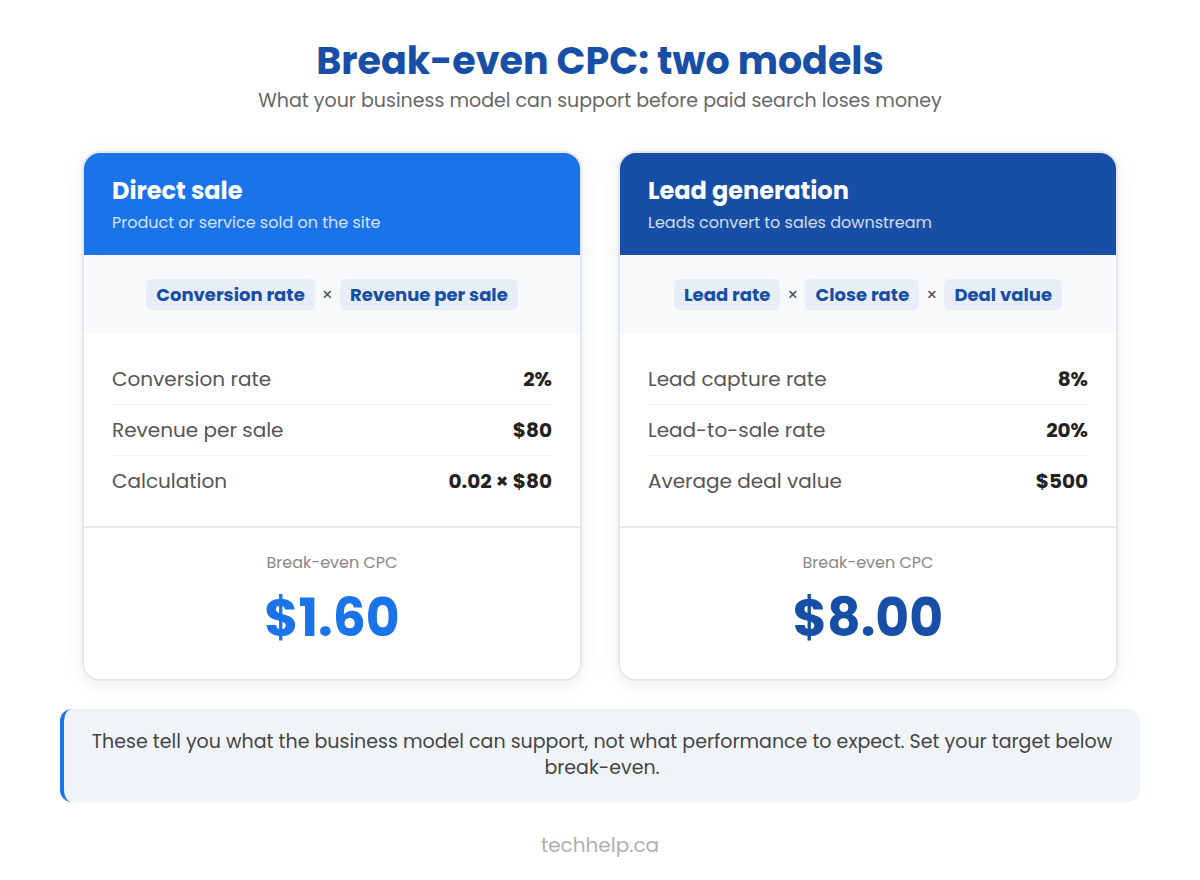
Know the break-even point #
For a direct sale, here's a simple way to estimate your break-even ceiling:
If 2% of clicks become sales and a sale produces $80 in gross profit:
At $1.60 per click, the simplified model leaves no contribution for overhead or growth. A practical target should be lower and should account for refunds, fulfilment, agency fees, creative, discounts, and customer lifetime value only when repeat behaviour is supported by data.
For lead generation, extend the model:
If 8% of clicks become qualified leads, 20% of those leads become customers, and gross profit per customer is $500:
 Expand
These formulas don't predict performance. They tell you what performance the business model can support.
Run the paid-search loop #
- Select a narrow commercial intent and calculate acceptable acquisition economics.
- Build a destination that matches the query, advertisement, offer, and device.
- Configure conversion measurement, campaign settings, exclusions, and a controlled budget.
- Launch tightly grouped keywords or products and inspect actual search terms.
- Trace key events into revenue, gross profit, or qualified pipeline.
- Improve queries, bids, ads, feed, page, offer, and follow-up in that order of evidence.
- Scale only while marginal traffic remains economically acceptable.
13System 13: paid social, display, and retargeting #
Paid social and display reach people before or outside an active search. They can create demand, demonstrate a product, promote a resource or event, acquire subscribers, and bring previous visitors back.
Test audiences and messages together #
Paid social can use interests, demographics, roles, behaviours, customer lists, or similarity models, subject to platform rules and data availability. Display, native, and video networks can reach contexts, topics, placements, or audiences across other sites and apps.
The creative does much of the targeting work. Show the problem, outcome, product, or insight quickly. Test meaningfully different concepts, not only minor visual changes. A strong first test might compare a customer story, a demonstration, and a data-led message.
Send each concept to a destination that continues it. A video about a specific use case shouldn't land on a generic product catalogue. Use exclusions to reduce obvious waste and separate prospecting from returning audiences in reporting.
Retarget with restraint #
Remarketing can bring back visitors who viewed a relevant page but didn't complete the key event. Segment by behaviour so the next message fits the previous visit. Someone who read a beginner article shouldn't receive the same ad as someone who abandoned a checkout.
Frequency controls, exclusions for recent converters, appropriate audience windows, and accurate consent handling protect both budget and trust. Tracking capabilities vary with browser settings, device choices, platform policies, and privacy law. Treat platform attribution as an estimate, not a perfect record of causation.
Run the paid-audience loop #
- Define the audience, offer, acceptable cost, and measurement window.
- Produce a small set of substantially different messages and formats.
- Build matching destinations and verify key-event tracking.
- Launch one controlled prospecting test and separate any retargeting campaign.
- Compare creative, audience, placement, landing-page behaviour, key events, lead quality, and business value.
- Refresh creative before fatigue and exclude placements or segments that consistently waste spend.
- Scale winning combinations and use incrementality tests when the spend justifies them.
14System 14: marketplaces, directories, and syndication #
Marketplaces, directories, aggregators, app stores, job boards, event calendars, professional registries, and content platforms already organize demand. They can introduce the business to people who would never begin on its website.
Select distribution that customers use #
A listing is worth maintaining when real customers use the destination, the category fits, the platform's standards are credible, and the business can respond to activity there. Relevant options may include:
- Ecommerce and service marketplaces
- App stores and integration directories
- Professional and licensing registries
- Industry associations and local chambers
- Supplier, distributor, dealer, and franchise locators
- Travel, restaurant, real estate, job, and event platforms
- Review and comparison sites
- Podcast, video, newsletter, and publishing platforms
Keep the name, description, category, price, availability, location, imagery, policies, and destination accurate. Tailor the listing to the platform's search and decision experience instead of pasting the homepage copy everywhere.
Avoid bulk submission to unrelated directories. A hundred low-quality listings create maintenance work and may create spam risk without reaching a customer.
Syndicate without abandoning the source #
Syndication can extend an article, video, podcast, dataset, press release, or product feed to platforms with built-in audiences. Publish the canonical or original version on the website when ownership of the source matters. Follow each platform's canonical, attribution, excerpt, and duplicate-content options; not every platform offers the same controls.
Adapt the introduction and call to action to the host audience. The syndicated version should provide real value there, then direct readers to a distinct reason to visit the source: the full dataset, calculator, template, interactive version, update subscription, or related library.
Run the marketplace-and-syndication loop #
- Identify platforms the audience already uses to find, compare, or consume the offer.
- Confirm costs, rules, data access, attribution, ownership, and customer relationship limits.
- Build an accurate native listing or version plus a distinct website destination.
- Track inventory, inquiries, referral visits, key events, fees, refunds, and customer quality.
- Collect permission to continue the relationship on owned channels where platform rules allow.
- Update the listing whenever the underlying offer changes.
- Leave platforms whose audience, economics, policies, or maintenance burden no longer fit.
15System 15: direct outreach and account-based traffic #
Direct outreach sends a relevant reason to visit to a defined person or organization. It can use personal email, direct messages, sales calls followed by a resource, account-based advertising, physical packages, or partner introductions.
This system is most suitable when the potential value of an account justifies research and personalization. It shouldn't be used to send unsolicited bulk messages that ignore consent, platform rules, or the recipient's context.
Build a destination for the account's decision #
Generic outreach often points to a homepage and asks the recipient to do the interpretation. A stronger route uses a page or resource matched to the account's industry, problem, role, or trigger.
The destination might be a short analysis based on public information, a relevant case study, a calculator, an integration or security page, a private workshop registration page, or a proposal hub with agreed documents and next steps.
Personalization must remain truthful. Don't imply that a person visited a page, used a product, or expressed an interest unless you have a legitimate basis for saying so.
For Canadian commercial electronic messages, confirm whether the outreach has the consent or other legal basis required under CASL. Include the required sender information and unsubscribe mechanism where the law applies. Other jurisdictions may impose different or additional rules.
Run the direct-outreach loop #
- Define a narrow account profile and the evidence that makes an account relevant now.
- Research the organization, role, likely problem, and existing relationship.
- Create a useful message and destination tied to that context.
- Contact a manageable number of qualified people through an appropriate route.
- Follow up with restraint and stop when asked or when the sequence ends.
- Measure delivered contacts, positive replies, qualified visits, meetings, opportunities, close rate, and revenue.
- Turn repeated questions into better pages, tools, and qualification criteria.
16System 16: offline-to-online traffic #
A conference slide, product label, receipt, business card, or trade show booth can all produce a website visit, but only when the next online step is specific and easy to remember.
At an event, direct people to the slides, workbook, assessment, or research mentioned in the presentation. On packaging, link to setup instructions, recipes, warranty registration, or replenishment. In a store, link to inventory, appointments, a product comparison, or accessibility information.
Make the handoff measurable #
Use a short, branded URL or QR code that resolves to a campaign-specific landing page. Add campaign parameters to the destination and label physical placements separately. A poster at the entrance and a handout at the checkout shouldn't share an indistinguishable link if you want to compare them.
Keep the human-readable URL visible beside a QR code. Some people can't or won't scan. Test the code from the expected distance, lighting, material, and device before printing at scale.
Avoid sending every offline visitor to the homepage. Continue the promise from the physical context so the person knows the scan or typed URL worked.
Use local relationships #
Workshops, trade associations, community sponsorships, supplier relationships, local media, complementary businesses, and customer events can introduce the website to a relevant audience. Give each partner a useful resource or offer with its own trackable route.
The value may show up as direct visits, branded searches, referral sessions, calls, or in-person sales. Ask new customers how they found the business and connect that answer to analytics rather than expecting one tool to capture the whole path.
Run the offline-to-online loop #
- Identify a physical moment in which a digital resource would be useful.
- Create a specific page, offer, tool, registration, or follow-up resource for that moment.
- Give it a short readable URL and a tested QR code when useful.
- Label each placement with distinct campaign tracking.
- Train staff, speakers, partners, or distributors to explain the benefit accurately.
- Measure scans, typed visits, key events, calls, foot traffic, and self-reported discovery together.
- Replace weak placements and keep successful materials accurate.
Connect the systems with a return path #
Most visitors won't buy, book, or subscribe during their first session. Every acquisition system needs a useful next step that matches the visitor's level of intent.
Design the next page #
Every important page should answer: where can this person go next?
- From an introductory article, link to a practical template or deeper explanation.
- From a comparison, link to specifications, pricing, a trial, or a consultation.
- From a product page, link to reviews, delivery information, compatible products, or support.
- From a report, link to the methodology, dataset, related analysis, or newsletter.
- From an event page, link to registration, calendar details, speaker information, or the recording.
Internal links should help the reader make progress. They also help search engines discover pages and understand the site's structure.
Create a return trigger #
A generic newsletter isn't the only way to earn a return visit. Consider:
- Price, inventory, job, funding, or regulatory alerts
- New benchmark data
- A saved calculator result or project
- A recurring checklist
- A member discussion or expert session
- Product replenishment or maintenance reminders
- A course with the next lesson delivered by email
- A personalized dashboard or account history
The return trigger should solve a recurring need. If the benefit exists only for the business, the audience has little reason to opt in.
Keep promises after the signup #
Deliver the resource immediately. Confirm what the person will receive and how often. Make preference changes and unsubscribing easy. Protect subscriber data and limit access to the people and systems that need it.
An engaged list is more valuable than a larger list assembled through vague consent, forced registrations, or unrelated giveaways.
Understand branded and direct demand #
As the systems work together, more people may search for the business by name, type its address, use a bookmark, or share untagged links privately. Branded search and genuine direct visits can be signs that the audience remembers the business, but analytics may blend them with activity whose source was lost.
Monitor branded search queries, new and returning users, customer surveys, and known campaign changes alongside the direct channel. Don't assign all direct traffic to “brand” or use growth in that bucket as proof that one specific campaign caused it.
Measure traffic without fooling yourself #
No single tool sees the whole customer journey. Search Console measures what happened in Google Search before a site visit, including impressions, clicks, queries, and average position. Analytics tools measure sessions and actions on the site. Advertising platforms report interactions they can observe and attribute under their own rules. CRM and sales systems show what happened after a lead arrived.
The numbers won't match exactly, and they aren't expected to. A Search Console click isn't the same thing as an analytics session. Consent choices, ad blockers, browser behaviour, time zones, attribution settings, redirects, and data processing can create differences.
Use a measurement hierarchy #
Swipe or scroll sideways to see the full table.
| Level | Question | Useful measures |
|---|---|---|
| Reach | Did the audience encounter the offer or page? | Search impressions, ad reach, video views, email delivery |
| Acquisition | Did people visit? | Sessions, users, clicks, landing-page visits |
| Quality | Did the right people engage? | Engagement rate, engaged sessions, useful page or tool interactions |
| Action | Did visitors complete the intended step? | Key events, session key-event rate, qualified leads, purchases |
| Business value | Did the activity create value? | Revenue, gross profit, pipeline, close rate, retention, customer value |
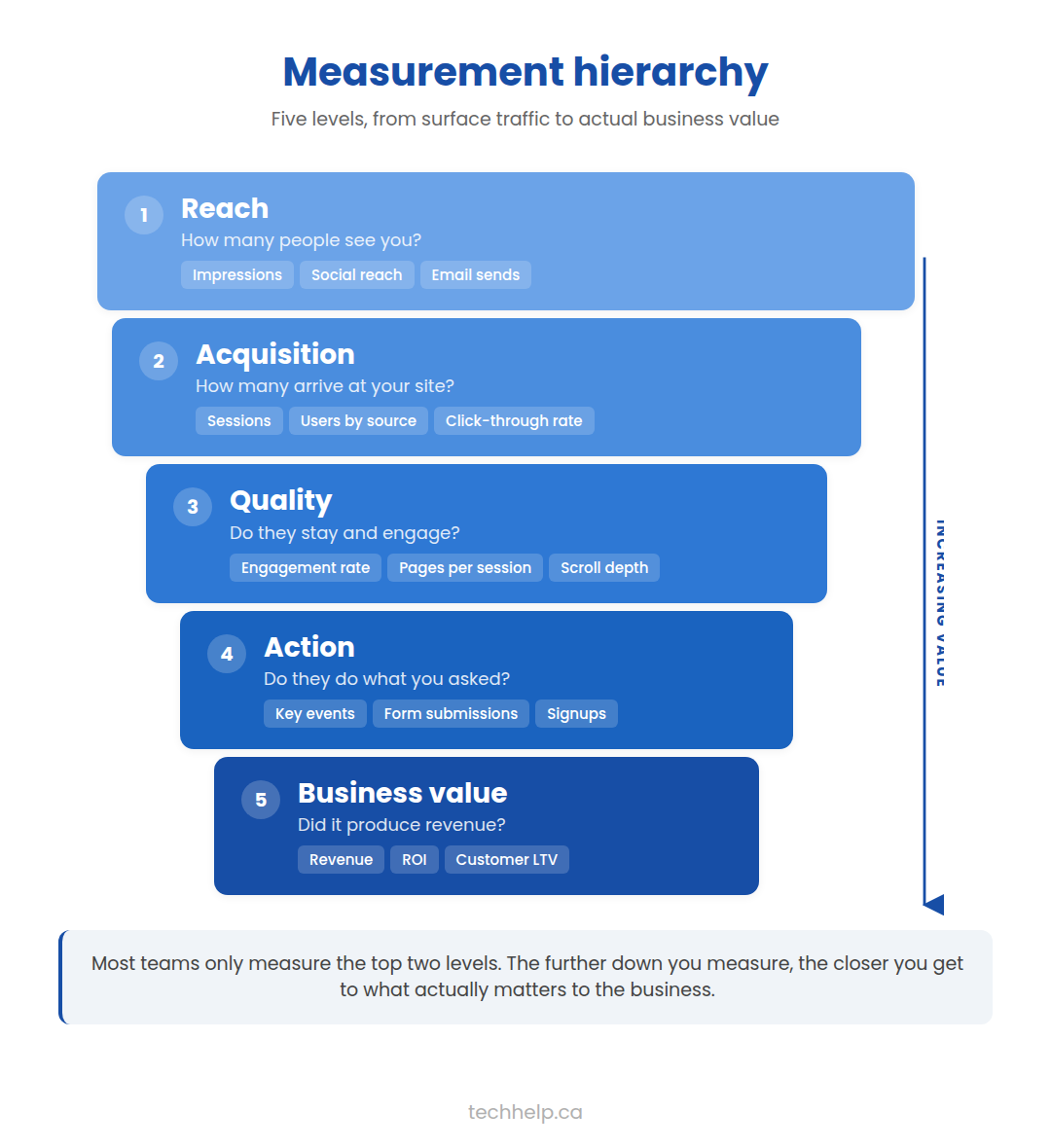 Expand
Move down the hierarchy when possible. Reach and acquisition diagnose delivery. Business value determines whether the traffic program deserves more investment.
Tech Help Canada's guide to digital marketing metrics and KPIs offers a broader measurement framework.
Name campaign links consistently #
Use UTM parameters on campaign links you control, such as newsletter links, partner placements, advertisements, QR destinations, and social posts. Establish a naming convention before the team creates links.
For example:
utm_source: linkedinutm_medium: paid_socialutm_campaign: traffic_report_2026utm_content: customer_story_video
Keep capitalization and separators consistent because analytics tools may treat variants as different values. Preserve a central campaign log containing the final URL, owner, dates, audience, creative, and intended key event.
Read the pattern, not one metric #
Use this diagnostic sequence:
Swipe or scroll sideways to see the full table.
| Pattern | Likely area to inspect | Possible next check |
|---|---|---|
| Search impressions, few clicks | Query fit or search presentation | Compare queries; review title, snippet, date, competing result types |
| Clicks, little engagement | Promise-to-page mismatch or page experience | Review landing page by source, device, speed, and query |
| Engagement, few key events | Offer, next step, trust, or measurement | Test CTA path; verify event tracking; review form friction |
| Key events, weak sales | Lead quality, qualification, follow-up, or economics | Connect CRM outcomes to source; inspect close rate and margin |
| Paid platform reports sales, business lift is unclear | Attribution overlap | Compare holdouts, regions, time periods, or incrementality tests |
| Traffic falls across the site | Technical, seasonal, market, or tracking change | Check uptime, deployment history, Search Console, demand, and analytics tags |
| One page falls while the site is stable | Page-specific relevance, competition, or technical issue | Inspect the URL, queries, content, links, and search-result changes |
| Returning traffic is weak | No return trigger or weak follow-up | Review subscriptions, repeat-use value, email engagement, and cohorts |
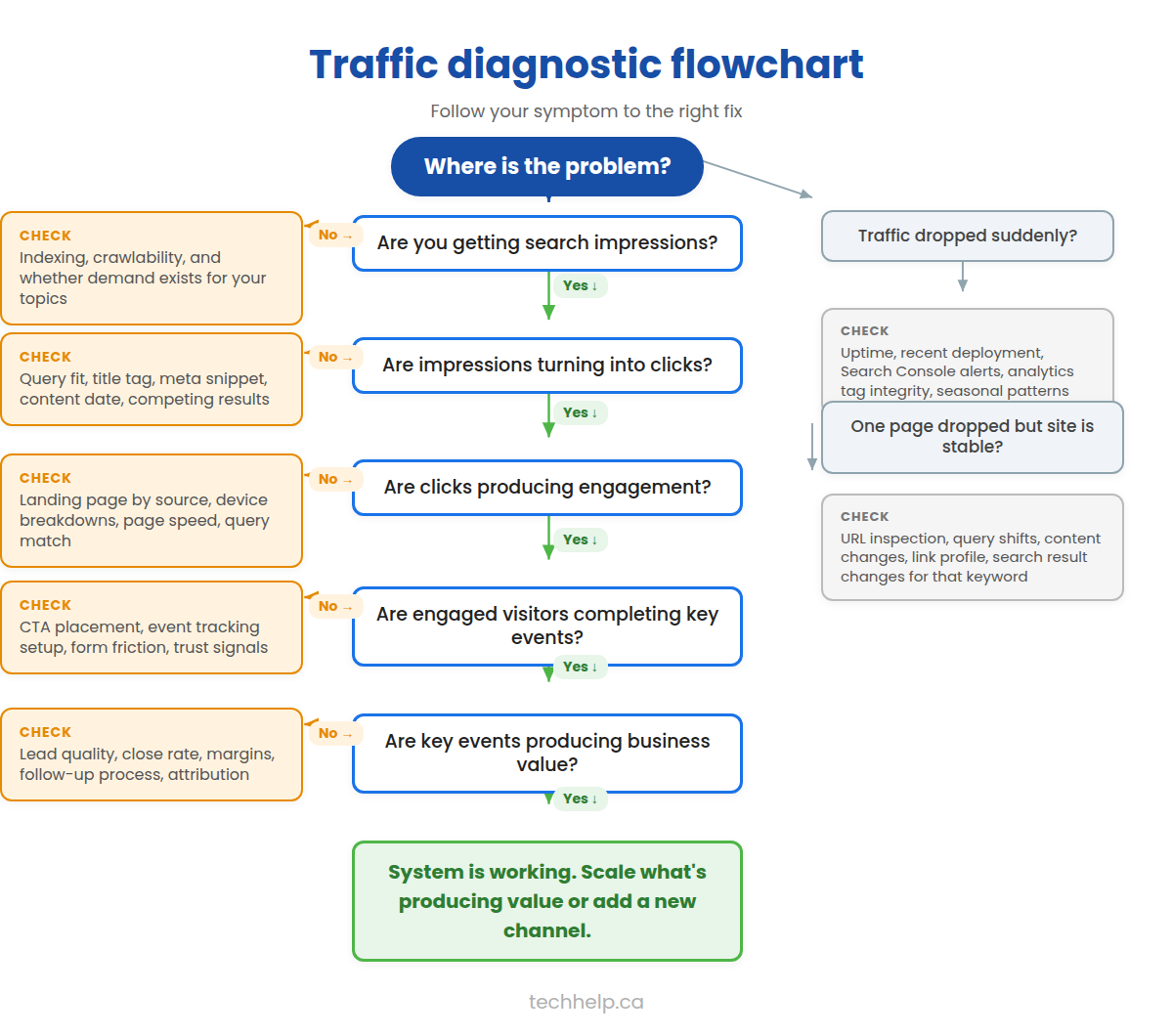 Expand
Don't make a major decision from a day or two of noisy data unless the event is clearly broken or costly. Compare appropriate periods, account for seasonality, annotate launches and site changes, and segment by channel, landing page, device, geography, and new versus returning users when those distinctions matter.
Use an experiment card #
For each meaningful change, record:
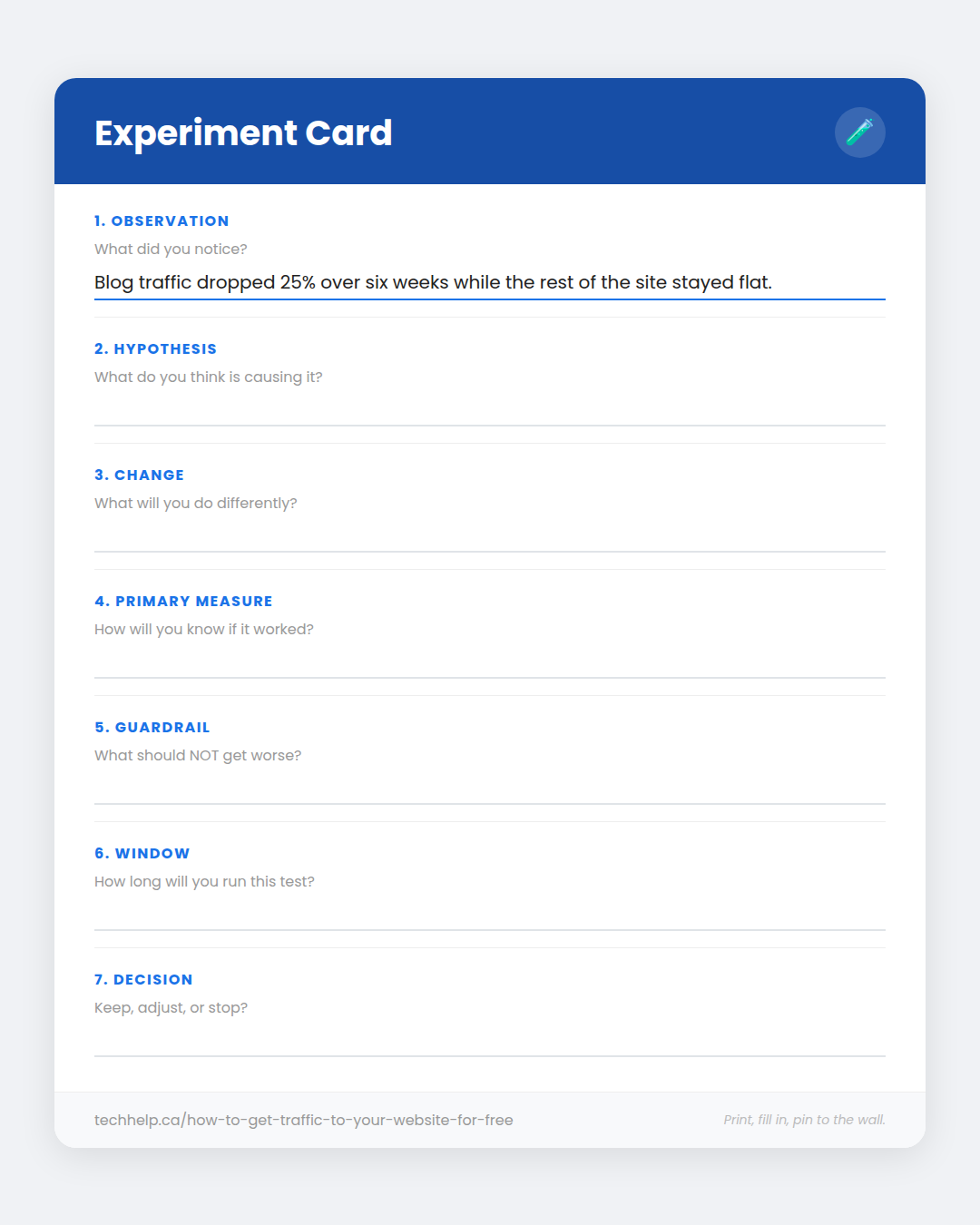 Expand
Interactive worksheet
Experiment Card
Fill in this experiment card for your next test. Print it or save as PDF when you’re done.
techhelp.ca/how-to-get-traffic-to-your-website-for-free/
This prevents “we tried SEO” or “social doesn't work” conclusions based on an undefined activity with no success threshold.
A 90-day website traffic plan #
Ninety days is long enough to build a working process and collect early evidence. It won't bring every channel to its full potential, but it can show which systems deserve continued testing.
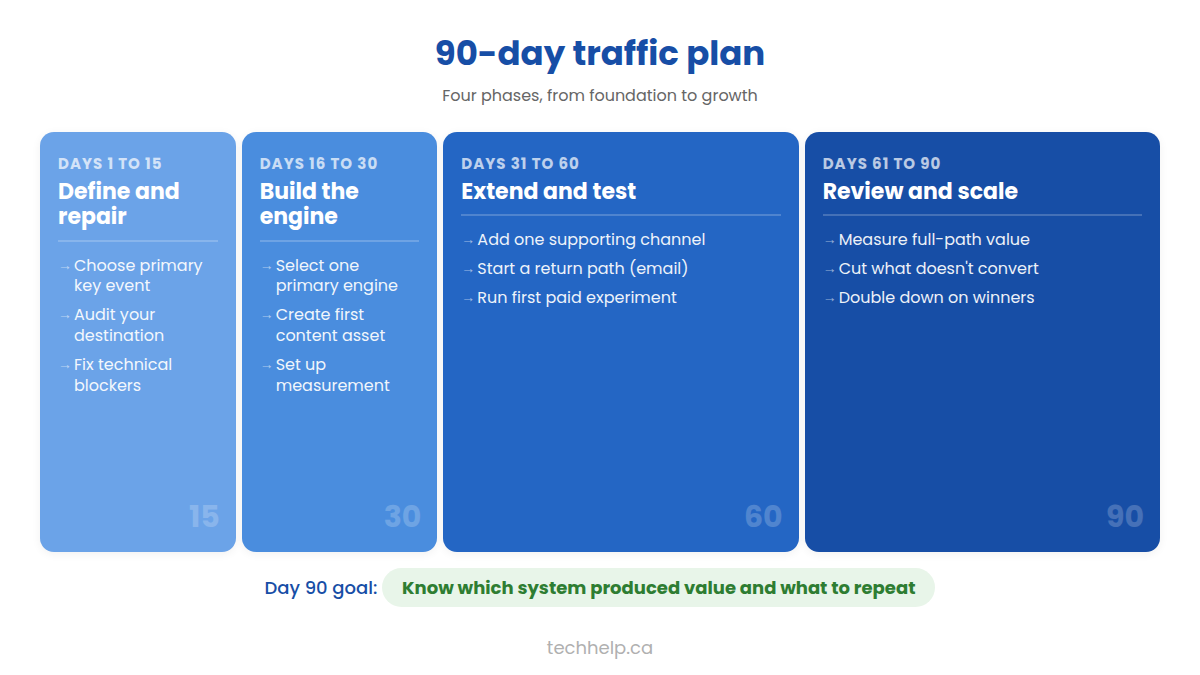
Days 1–15: define and repair #
- Choose the primary key event and assign an estimated value.
- Define the audience, need, buying stage, and geographic or operational limits.
- Audit the primary destination for message match, trust, mobile usability, speed, accessibility, and conversion friction.
- Verify analytics, Search Console, CRM, advertising tags, and consent handling.
- Record the baseline for qualified visits, key events, conversion rate, revenue or pipeline, and channel mix.
- Score potential acquisition engines and select one primary engine plus one supporting channel.
Days 16–30: build the asset and campaign #
- Choose one audience problem with evidence of demand or strategic importance.
- Select the most useful format: page, tool, offer, research, video, event, comparison, or template.
- Write the distribution brief and identify likely search queries, partners, communities, placements, and subscriber segments.
- Build the destination and its next step.
- Prepare channel-specific creative, messages, tracking links, and an outreach list.
- Review claims, sources, disclosures, accessibility, and technical readiness.
Days 31–60: launch and distribute #
- Publish the central asset and request indexing when search is part of the plan.
- Distribute through the selected support channel instead of posting everywhere at once.
- Send specific outreach to relevant partners, experts, publications, or communities.
- Launch the paid or organic acquisition test with a documented budget and threshold.
- Respond to questions and use them to improve the asset.
- Fix tracking or experience failures immediately; don't optimize creative around broken measurement.
Days 61–90: diagnose and improve #
- Compare channel and landing-page results with the baseline.
- Trace key events into sales, revenue, or other business outcomes where possible.
- Use the diagnostic table to identify the largest leak.
- Run one meaningful improvement test.
- Update the asset with new questions, evidence, or usability changes.
- Decide whether to continue, scale, change, or stop the channel.
- Document the process so the next campaign starts with what the team learned.
At the end of 90 days, a good result isn't just a higher traffic number. It's knowing which audience, promise, asset, distribution route, and destination produced value, and what you'll repeat next.
Where traffic plans break down #
Trying every channel at once #
A few social posts. An unfinished video. A small search test. Two blog articles. None gets enough attention to become a functioning system, yet the team concludes that traffic “doesn't work.” Give one engine a fair test. Make it measurable and repeatable, then add the next.
Sending every visitor to the homepage #
The homepage has too many jobs. Someone who clicked an ad for one service shouldn't have to sort through every product, company update, and audience the business serves. Build or improve the page that continues the specific promise used in search, advertising, email, or outreach.
Publishing without distribution #
Search may eventually discover the page, but “publish and hope” isn't a launch plan. If the intended audience never encounters the asset, the distribution failed. Identify the people and channels that benefit before creating it.
Buying low-quality traffic or links #
Cheap clicks, automated visits, unrelated placements, and ranking-oriented link schemes can make reports look busy while producing no customers. Worse, they can create fraud, brand, security, and search-policy risks that outlast the campaign.
Confusing attribution with causation #
A platform may claim credit for a conversion after showing an ad or receiving a click. That report doesn't prove the conversion wouldn't have happened anyway. When the investment is large enough, use business data and controlled comparisons to separate campaign lift from attribution.
Measuring content by word count #
A long article can still leave the reader's task unfinished. Length is a production characteristic, not a business result. Measure whether the asset completes the task, earns discovery and distribution, supports a meaningful next step, and remains worth maintaining.
Treating technical scores as the strategy #
A perfect audit score can't create audience demand. It can't make an offer more compelling. Technical work removes barriers, but it doesn't replace positioning, evidence, distribution, or customer value.
Assuming organic traffic has no cost #
“Free traffic” still has a cost. SEO, content, email, community work, and partnerships require labour, expertise, software, design, and maintenance. Compare their full cost and opportunity cost with the results they produce.
Your one-page traffic plan #
You don't need to run all 16 systems. You need the right few working together.
A working traffic generation strategy needs one audience, one useful destination, one primary acquisition engine, one distribution route, one return path, and one measurement process you can improve. Fill in these eight fields, and you've got a plan worth running:
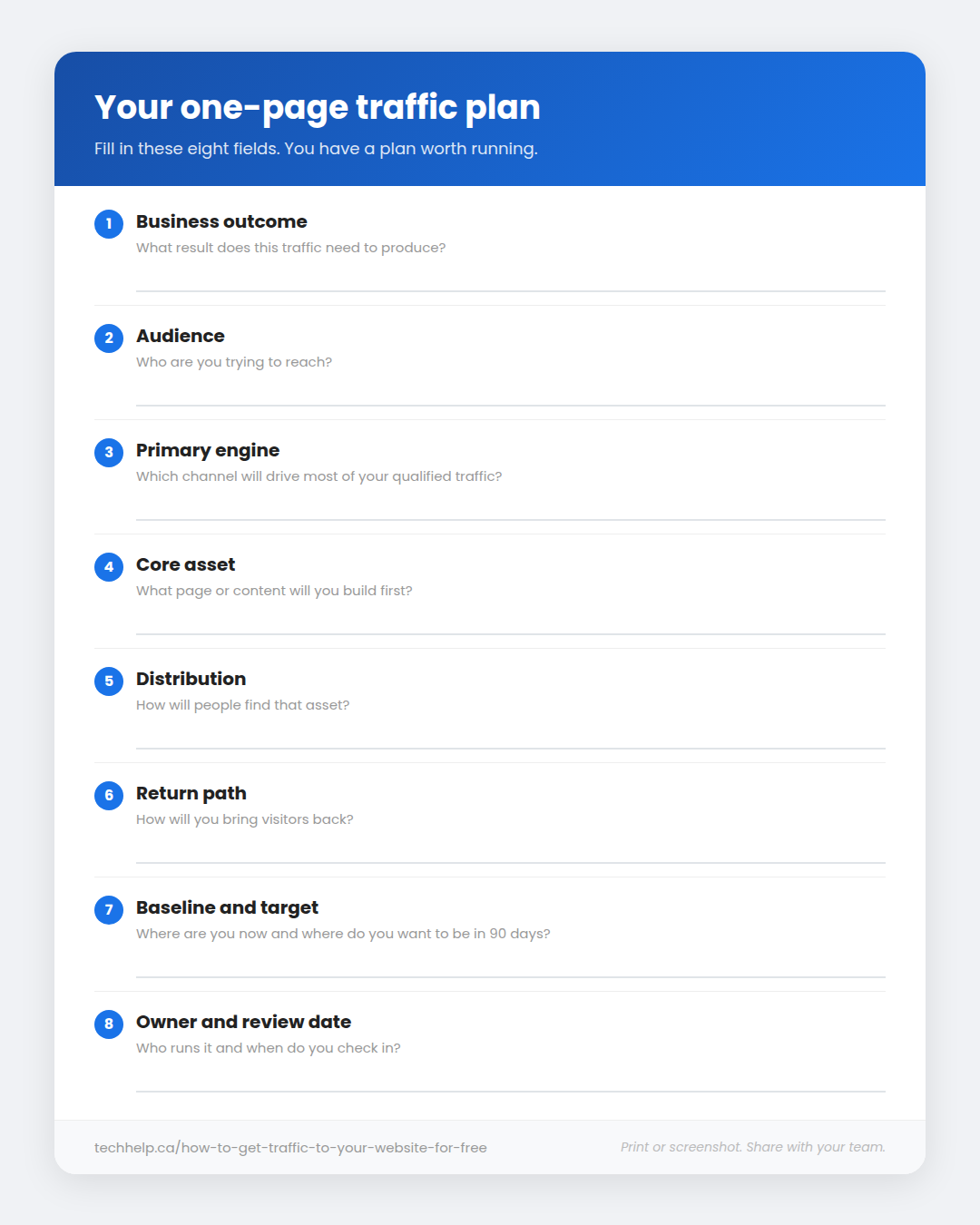 Expand
Interactive worksheet
Your One-Page Traffic Plan
Fill in your one-page traffic plan. You have a plan worth running. Print it or save as PDF when you’re done.
techhelp.ca/how-to-get-traffic-to-your-website-for-free/
Then run the loop. Find where it leaks. Fix that part.
Sustainable website traffic isn't a single campaign or a lucky ranking. It's the result of repeatedly earning the right person's attention and making the visit worthwhile.
Frequently asked questions #
What is the fastest way to get traffic to your website?
Paid search or paid social can begin sending visits after a campaign is approved, while email can produce immediate return traffic when you already have a permission-based list. Direct outreach and active communities can also create early visits for a narrow audience. Speed alone doesn’t make a channel profitable, so prepare the destination and conversion tracking before promotion.
How long does SEO take to increase website traffic?
There’s no fixed SEO timeline. Google says the effect of a change can take from a few hours to several months, depending on the change and when its systems process it. Give meaningful work at least a few weeks before evaluating the early result, then use Search Console and website analytics to decide what to improve. New sites, competitive searches, and major technical problems can require more time.
Can you get website traffic for free?
You can attract visits without paying a media fee through SEO, local search, email to an eligible list, organic social media, communities, partnerships, referrals, digital PR, free tools, directories, and speaking. These channels still require time, expertise, production, software, or maintenance, so free traffic isn’t costless traffic.
What are the main types of website traffic?
Common traffic types include organic search, paid search, referral, organic social, paid social, organic video, paid video or display, email, affiliates, marketplaces, direct or unattributed visits, and offline-to-online traffic. The exact labels depend on the analytics platform and campaign tagging. Direct traffic doesn’t always mean someone typed the address; it can also mean the system couldn’t identify a source.
How much traffic does a website need to make money?
There’s no universal visitor number. Estimate value with qualified visits multiplied by the key-event rate and the value of each key event. A site with a small, well-matched audience can outperform a much larger site with weak intent or poor conversion. Include lead quality, close rate, gross profit, refunds, and repeat purchases when those factors apply.
Why is my website not getting traffic?
A site may have no discoverable pages, weak demand, an offer people don’t choose, no distribution, technical indexing problems, inaccurate measurement, or a mismatch between the promotion and landing page. Diagnose the stage that’s failing. No search impressions points to a different problem than impressions with no clicks, while clicks with no key events usually point to the page, offer, audience, or tracking.
How should you choose a traffic system?
Score serious options by audience fit, intent, speed, asset fit, budget, measurement, and durability. Start with one primary acquisition engine, add one supporting distribution system, and create a return path such as email or a repeat-use tool. Add another system only when the first has a reliable process, owner, and evidence of value.
Does AI search require a separate SEO strategy?
Not for Google’s AI Overviews or AI Mode. Google says these features use the same SEO foundations as Search and don’t require special schema or a new machine-readable file. Make important pages crawlable and indexable, use helpful text and media, support claims, maintain a strong page experience, and ensure structured data matches the visible content.
Should you use paid and organic traffic together?
They can work well together when each has a defined job. Paid campaigns can test messages, reach demand quickly, or scale a working offer. Organic search, content, referrals, communities, and email can build assets and relationships that keep producing value without a fee for each visit. Use shared business measures so the channels support one portfolio instead of competing for credit.
How do you get traffic to your website without social media?
Search, email, communities, referrals, digital PR, free tools, marketplaces, and offline promotion all work without a social media presence. Choose the systems that match where your audience already looks for answers, then use email or another return path so first visits can become repeat visits.
Sources
- https://support.google.com/analytics/answer/9756891
- https://support.google.com/analytics/answer/15258820
- https://support.google.com/analytics/answer/15612152
- https://support.google.com/analytics/answer/9267568
- https://support.google.com/analytics/answer/14731736
- https://developers.google.com/search/docs/fundamentals/seo-starter-guide
- https://developers.google.com/search/docs/fundamentals/creating-helpful-content
- https://developers.google.com/search/docs/appearance/ai-features
- https://developers.google.com/search/docs/appearance/title-link
- https://developers.google.com/search/docs/appearance/snippet
- https://developers.google.com/search/docs/appearance/core-web-vitals
- https://developers.google.com/search/docs/crawling-indexing/mobile/mobile-sites-mobile-first-indexing
- https://developers.google.com/search/docs/crawling-indexing/sitemaps/overview
- https://developers.google.com/search/docs/crawling-indexing/robots/intro
- https://developers.google.com/search/docs/crawling-indexing/consolidate-duplicate-urls
- https://developers.google.com/search/docs/monitor-debug/google-analytics-search-console
- https://developers.google.com/search/docs/monitor-debug/debugging-search-traffic-drops
- https://developers.google.com/search/docs/essentials/spam-policies
- https://developers.google.com/search/blog/2023/08/howto-faq-changes
- https://support.google.com/business/answer/7091
- https://support.google.com/google-ads/answer/16560108
- https://ised-isde.canada.ca/site/canada-anti-spam-legislation/en/getting-consent-send-email
- https://www.w3.org/WAI/WCAG22/quickref/
- https://sparktoro.com/blog/in-2026-less-than-one-third-of-google-searches-still-send-a-click/